Cubed
A monophonic acid bass synthesizer in the spirit of the silver box. One oscillator, a resonant ladder filter driven by a single envelope, an accent circuit, slide, and a built-in step sequencer holding 16 patterns of up to 64 steps.
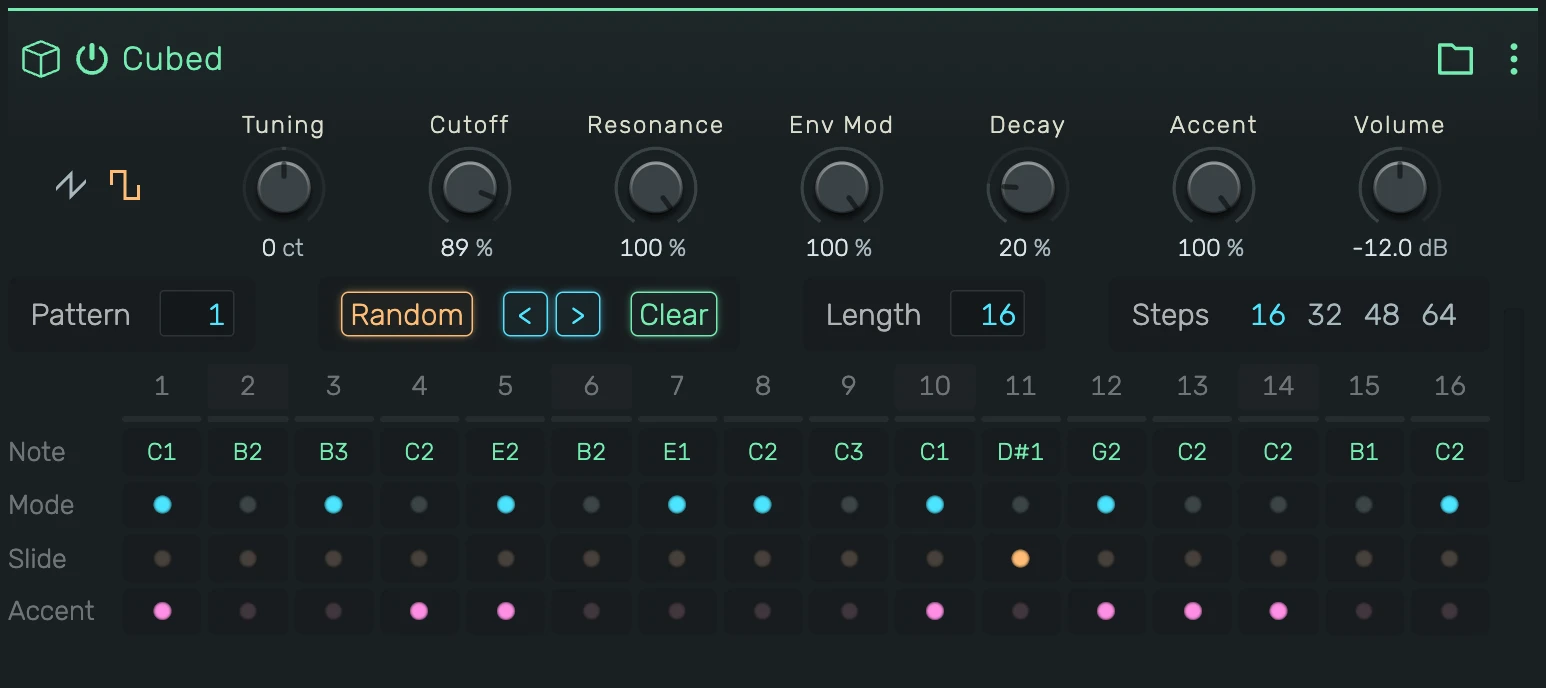
0. Overview
Cubed is deliberately small. There is one voice, one oscillator, one filter and one envelope, and almost everything that makes the sound comes from how the sequencer drives them: which steps have a gate, which slide into the next, and which carry an accent.
Oscillator (Saw | Square) ──> Resonant Ladder Filter ──> VCA ──> Output
                                        ↑                 ↑
                                   Env Mod ──── Envelope ─┘
                                        ↑                 ↑
                                     Accent ──────────────┘
The filter envelope is the same one that opens the amplifier, scaled by Env Mod and shortened by Decay. Accent adds a shot of level and brightness on top, and a slide glides the pitch into the next note without re-articulating it.
Example uses:
- Classic acid lines: high resonance, plenty of env mod, short decay, accents on the off-beats
- Rubbery sub basses: cutoff low, resonance low, few accents, slides on every second step
- Squelchy leads: square wave, resonance near maximum, long decay
- Percussive blips: cutoff low, env mod full, decay at minimum
1. Sound Section
1.1 Waveform
The two icons on the left switch the oscillator between Sawtooth and Square. Saw is the fuller, brighter of the two; square is hollower and reads lower in a mix.
1.2 Tuning
Master tuning in cents, ±1200 (an octave either way). Centred at 0 ct; it snaps back to centre while dragging.
1.3 Cutoff
Filter cutoff frequency. This is the resting point of the filter, the envelope moves upward from here.
1.4 Resonance
Emphasis around the cutoff frequency. Low values give a plain, rounded filter; high values give the whistling, vocal peak the instrument is known for. Held notes at high resonance keep growing for a while before they ring fully, exactly as the hardware does.
1.5 Env Mod
How far the envelope pushes the cutoff. At 0% the filter stays where Cutoff sets it and the sound is static. Turning it up opens the filter on every note and gives the classic downward sweep as the envelope falls.
1.6 Decay
Length of the filter envelope's fall. Short settings make each step a blip; long settings let the sweep run across several steps, so consecutive notes ride on top of one another.
1.7 Accent
Intensity of the accent circuit: how much louder and brighter an accented step becomes. The accent itself is on or off per step, this knob only sets how hard it hits.
The accent circuit has to recharge. Every gate consumes part of it, so an accent in the middle of a dense run is softer than one after a rest. That is the hardware behaviour, and it is what makes accent placement musical rather than a volume switch.
1.8 Volume
Output level in dB.
2. Pattern Section
2.1 Pattern
Selects one of the 16 patterns. Changing it by hand takes effect at the next bar line, so switching while the sequencer runs never breaks the running bar. Selecting the pattern that is already playing cancels an armed switch.
The parameter is automatable like any other. An automated change is a curve with its own timing, so it takes effect immediately rather than waiting for the bar.
Right-click the field to copy or paste the pattern itself, see 6. Exchanging Patterns.
2.2 Random
Fills the current pattern with a generated line. Click for another variation using the current settings, shift-click to open the generator dialog:
- Root and Scale: the key the notes are drawn from
- Contour: Free (jumps anywhere), Walk (small steps from the previous note), Rise and Fall (a ramp across the pattern)
- Octave: the lowest octave, Spanning: how many octaves the line may cover
- Motif: repeat length. Off generates every step freely,
2,3,4or8generate a figure of that length and loop it through the pattern - Density: how many steps get a gate, Accent and Slide: how often those flags are set
- Start on tonic: forces step 1 to the root, gated
2.3 < and >
Rotate the pattern one step to the left or to the right. Useful for shifting a line off the downbeat without editing each step.
2.4 Clear
Empties the current pattern. The other 15 are untouched.
2.5 Length
Number of steps the pattern plays, 1 to 64. The sequencer wraps after this many steps; the grid dims the index of every step beyond it.
2.6 Steps
Which block of 16 steps the grid shows: 16, 32, 48 or 64. This is a view switch only, it does not change the pattern.
3. The Step Grid
Four rows per step, with the step numbers on top and a playhead row underneath that lights the step currently sounding.
3.1 Note
The pitch of the step. Drag a cell up or down to transpose it, hold and drag further for wider jumps, or double-click to
type a value, either a name such as C2, F#1 or Bb3, or a MIDI number such as 48.
3.2 Mode
The gate. A lit cell plays, a dark cell is a rest. Notes stay stored in unlit steps, so switching them back on restores the line.
3.3 Slide
Glides from this step into the next one instead of playing two separate notes. The gate never closes across a slide, which is why a slide does not restart the envelope: the pitch bends, the filter sweep keeps falling.
Chaining slides ties several steps into one long note whose pitch moves.
3.4 Accent
Marks the step as accented: louder, brighter, and with a snappier attack, scaled by the Accent knob.
4. Timing
Steps are sixteenth notes, and the sequencer follows the transport: it plays while the project plays and stops with it.
A gated step holds 55% of its step, so notes stay detached unless a slide bridges them. A sliding step holds 105% instead, which is what makes it overlap the next note and glide into it. Both figures are part of the voice calibration, not settings.
5. Playing It Live
Cubed accepts notes from the piano roll, a clip or a MIDI keyboard while its own pattern runs. Both sources feed the same single voice, and the last note played wins.
Live notes get the same treatment as pattern steps:
- Accent from velocity: a note accents at MIDI velocity 100 of 127 or above. The threshold sits at 78.7% of the velocity lane, so anything from 79% up fires it. The pattern uses the same scale, a plain step sends 50% and an accented step sends 100%
- Slide from legato: overlap two notes and the second glides out of the first
So a recorded or drawn line behaves like a pattern written in the grid, with no extra switches to set.
6. Exchanging Patterns
The pattern actions sit in two places. Right-click the Pattern field for the clipboard entries, or open the device menu and pick Pattern for those plus the ABL importer.
All of them write into the current pattern and leave the other 15 alone, all of them replace the pattern as a whole rather than merging into it, and all of them undo in one step.
6.1 Copy and Paste
Copy Pattern puts the current pattern on the clipboard, Paste Pattern writes it back. Note, gate, slide, accent and the pattern length all travel together. It is the system clipboard, so a pattern moves between the 16 slots, between two Cubed devices, and between two openDAW tabs.
Paste Pattern stays available even when the clipboard holds nothing usable, because a browser only hands over the clipboard after the click. Nothing changes in that case and a short message says so.
6.2 Pattern as JSON
Copy Pattern to JSON puts the same pattern on the clipboard as readable text instead, and Paste Pattern from JSON reads it back:
{
  "type": "cubed-pattern",
  "version": 1,
  "length": 4,
  "steps": [
    {"note": "C2", "gate": true, "slide": false, "accent": true},
    {"note": "D#2", "gate": true, "slide": true, "accent": false},
    {"note": "C3", "gate": false, "slide": false, "accent": false},
    {"note": "A#3", "gate": true, "slide": false, "accent": true}
  ]
}
That makes a pattern editable anywhere text goes. Paste it into a chat with an AI, ask for a variation, a transposition or a different rhythm, and paste the answer back.
Reading is lenient. note takes a name or a MIDI number, a missing flag counts as false, length falls back to the
number of steps listed, and anything past 64 steps is dropped. Text that does not read as a pattern is refused and the
pattern stays as it was.
6.3 Loading ABL Patterns
Load ABL .pat… imports pattern files exported by AudioRealism Bass Line, including note, gate, slide and accent per step, and sets the pattern length to match the file.