Playfield
A sample-based drum machine and sampler with a grid of pads, each mapped to a MIDI note. Load samples, trigger them via MIDI or mouse, and shape each sound individually.
0. Overview
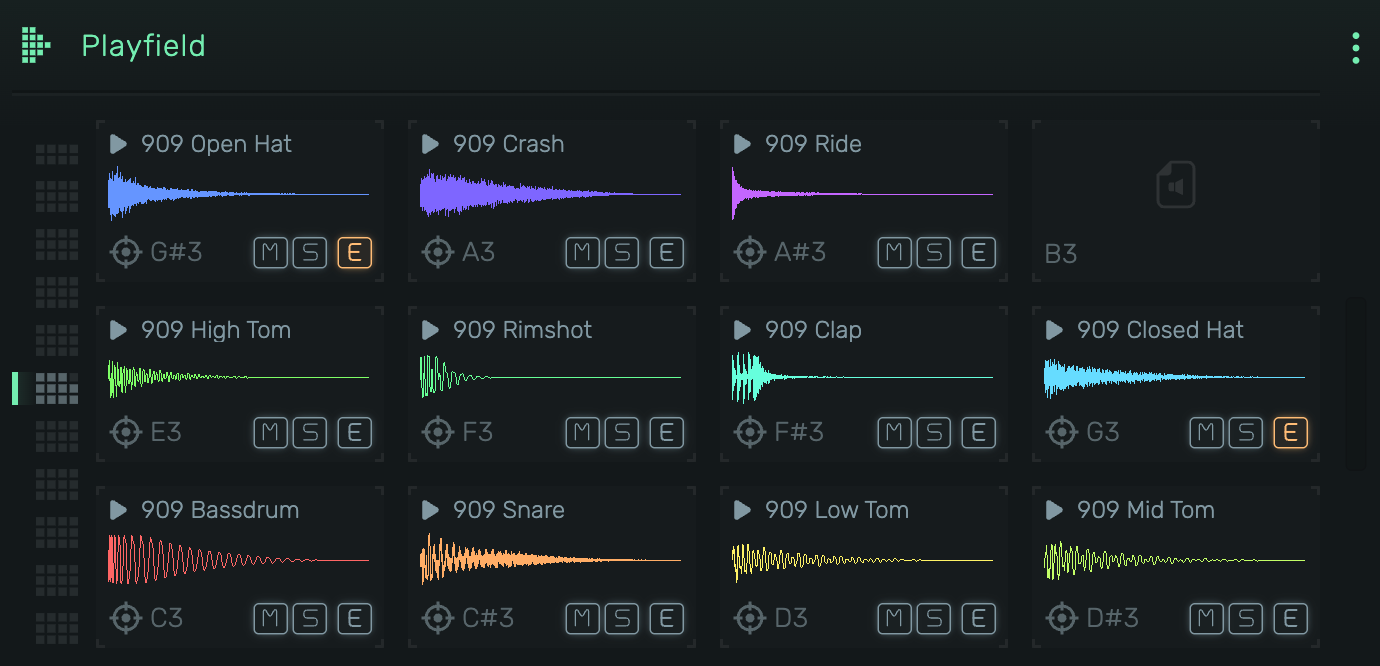
Playfield organizes samples in a grid layout, with each pad assigned to a specific MIDI note. Drag samples onto pads, preview them with a click, and fine-tune playback parameters in the sample editor.
Example uses:
- Drum kits with per-sample control
- One-shot sound effects and stingers
- Chromatic sampling across multiple notes
- Layered percussion with exclusive groups
1. Grid View
The main interface showing all sample pads in a 4x3 grid (one octave).
1.1 Sample Pad
Each pad displays:
- Header: {icon:Play} icon and sample name (click to preview)
- Waveform: Visual representation of the sample with playback position
- Note: MIDI note assignment (e.g., C3, D#4)
- M (Mute): Silences the pad
- S (Solo): Solos the pad, muting all others
- E (Exclusive): Enables exclusive group mode. When active, triggering this pad stops other exclusive pads.
- {icon:Focus} Opens the sample editor. Highlighted orange when audio effects are applied.
1.2 Loading Samples
- Drag & drop: Drop audio files directly onto empty or occupied pads
- Move samples: Drag a sample from one pad to another to swap positions
- Copy samples: Hold ⌥ and drag a sample to copy it to another pad
- Move to another octave: Drag a sample over the octave dots on the left, hold until the octave switches, then drop on any pad
- Context menu: Right-click a pad to browse for samples
- Delete: Select a pad and press Delete to remove the sample
Note: Copying uses ⌥ (Option/Alt) instead of ⌘ (Command) due to a long-standing browser limitation on macOS where the drop event doesn't fire when Command is held during drag operations.
1.3 Previewing
Click the header area ({icon:Play} + name) to trigger the sample. Release to stop (respects gate settings).
1.4 Octave Navigation
Use the octave selector to view different octave ranges. Each octave shows 12 pads (C through B).
2. Sample Editor
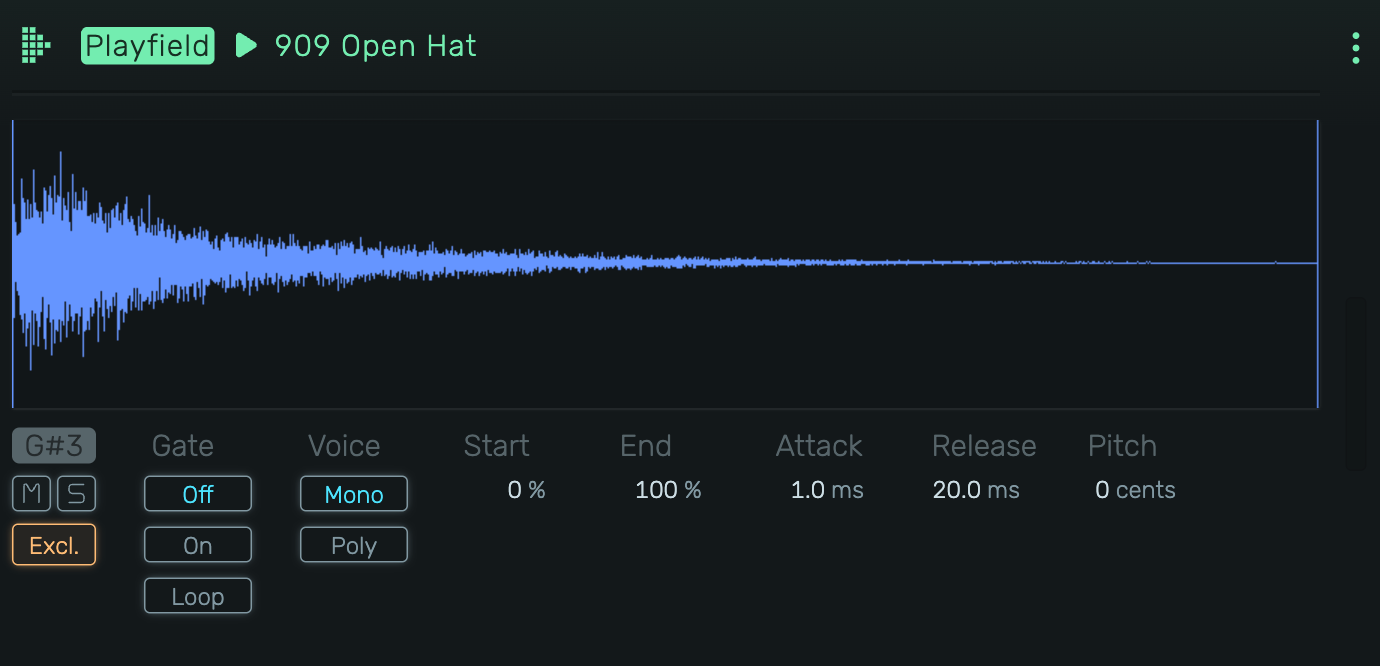
Click the {icon:Focus} icon on any pad to open the detailed sample editor.
2.1 Waveform Display
Large waveform view with draggable start and end markers. The colored vertical line shows the current playback position.
- Drag left marker: Adjust sample start point
- Drag right marker: Adjust sample end point
2.2 Note Assignment
Displays the MIDI note this pad responds to (e.g., G#3). This is determined by the pad's position in the grid.
2.3 Mute / Solo
- M (Mute): Silences this sample
- S (Solo): Solos this sample, muting all other pads
2.4 Excl. (Exclusive Group)
When enabled, this sample belongs to an exclusive group. Triggering any sample in the group stops all other samples in the same group. Classic use: open and closed hi-hats.
2.5 Gate
Controls how the sample responds to note-on/note-off:
- Off: Sample plays to completion regardless of note length
- On: Sample stops when note is released
- Loop: Sample loops while note is held
2.6 Voice
- Mono: Only one instance plays at a time (re-triggering restarts)
- Poly: Multiple overlapping instances can play simultaneously
2.7 Start
Sample start position as percentage (0-100%). Use to skip the beginning of a sample.
2.8 End
Sample end position as percentage (0-100%). Use to cut off the tail of a sample.
2.9 Attack
Fade-in time when the sample starts. Prevents clicks and creates smoother entrances.
2.10 Release
Fade-out time when the sample stops (via gate or reaching the end). Smooths out the tail.
2.11 Pitch
Pitch adjustment in cents (-100 to +100). Use for fine-tuning or subtle detuning effects.